


ACL & Knee Physical Therapy
4.029.00 Reviews
App Specs
- Version
- 1.5.1
- Updated On
- License
- Free
- Downloads
- 50,000+
- Developer
- Curovate Inc.
- Categories
- Medical
- Platform
- Android
Screenshots
 Analysis by AppCompare
Hey there! So, I recently had the chance to dive into the ACL & Knee Physical Therapy app, and let me tell you, it's quite the experience. If you’ve ever had a knee injury or just want to keep those joints in tip-top shape, you might find this app to be your new best friend. Let me walk you through my experience with it.
A focused tool, not a substitute for care
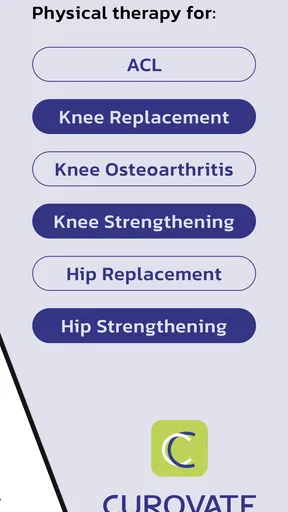
This is a medical app from Curovate Inc. built around guided knee rehabilitation, rather than a general fitness library with a few leg exercises mixed in. That narrow focus is useful: ACL recovery, knee replacement rehabilitation, and knee arthritis call for different goals, and a video-led program is more relevant to those needs than a generic workout timer. The app is free to download, while optional in-app purchases range from $0.99 to $559.99 per item, so I would check the cost of anything you plan to use before treating the free download as the whole experience.
I’d place it alongside a home exercise handout or a general physiotherapy video library, but with a more structured, knee-specific focus. A handout can be easier to print and follow offline; broad workout apps offer more variety for whole-body training. This app makes the most sense when you want knee exercises explained visually and a dedicated place to keep your rehabilitation routine in view. It isn’t a replacement for an assessment, especially when pain is new, severe, changing, or follows a recent procedure.
Getting Started with ACL & Knee Physical Therapy
First things first, downloading the app was a breeze. Available on both Android and iOS, it didn’t take long before it was up and running on my phone. Once you open it, you're greeted with a clean and straightforward interface. No fluff, just straight to business, which is perfect if you're someone who values simplicity.
The app is rated for Everyone, has a 4.0 average from around 410 ratings, and has been installed over 10,000 times. Its current version is 1.5.1, and it supports Android 7.0 and later. Those details give a sense of the app’s availability, but a rating can’t tell you whether a particular exercise plan is appropriate for your knee or stage of recovery. I’d treat the app as a guide to use alongside the advice of a clinician, not as a way to diagnose an injury or decide on treatment by itself.
After signing up, the app asked for a few personal details to tailor the experience. It’s not invasive at all, just some basic info like age, physical activity level, and any existing knee issues. This initial setup ensures that the exercises and advice you get are aligned with your individual needs.
What I’d check before sharing personal details
Rehabilitation can involve information that feels personal: your activity, symptoms, and recovery progress. I’d pause during setup to read each prompt and decide whether I’m comfortable answering it, rather than rushing through just to reach the exercises. The details requested in the original setup are relevant to personalizing a knee program, but I wouldn’t assume that relevance tells me everything about how information is handled. When privacy is important to you, check the app’s current privacy and permission choices on your device and in the app before entering details.
Worth Reading Before You Choose

Flipboard Shows What News Apps Must Do Beyond the Feed

Switching to Android Auto Means Rethinking Your Driving Routine

Google Calendar Makes a Crowded Week Easier to Manage

Ludo King Makes the Most of the Minutes Between Plans

Baby Panda World Brings Quick Play to Modern Phones, but Its Game Library Feels Busy

ESPN’s Live Game View Makes Following Close Games Easier
I also wouldn’t enter more about a condition than the app asks for, or use a shared phone without thinking about who may see saved information. Those are small habits, but health-related notes deserve more care than a routine workout log. If you’re helping a family member, let them make choices about their own information where possible, and avoid treating your own account as a place to store someone else’s medical history.
Exploring the Features
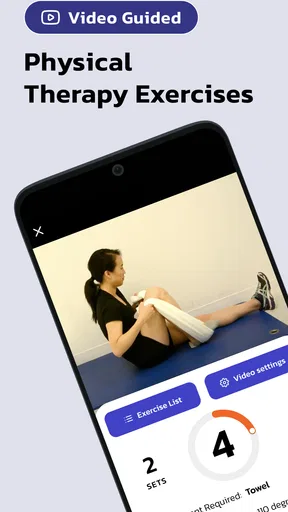
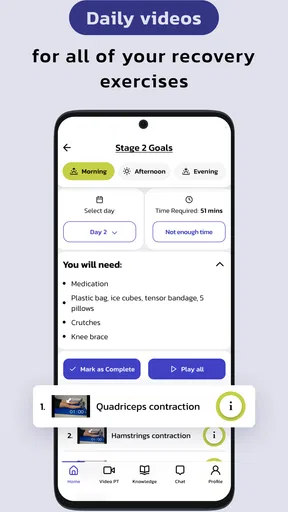
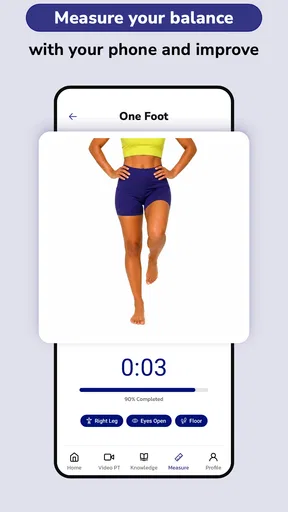
What really got me hooked was the range of exercises available. There’s everything from warm-ups to advanced strength training routines, all designed to help with recovery and strengthening of the ACL and knees. Each exercise comes with a detailed video demonstration. I found these super helpful, especially when trying to master the correct form.
Videos are most useful when I can give them my full attention, so I’d watch a demonstration before starting a set rather than trying to learn it while balancing or moving through the exercise. A practical routine is to review the next movement, clear enough floor space, and then put the phone somewhere visible but out of the way. That makes the visual guidance easier to follow without turning the phone itself into a distraction.
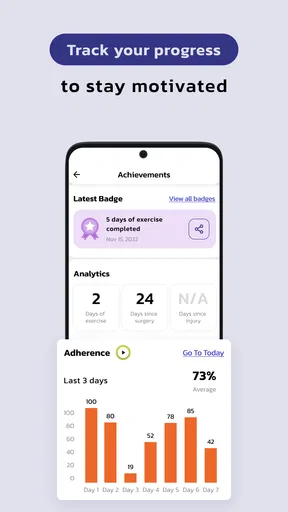
There’s also a nifty feature that lets you track your progress. You can log your workouts, note any pain or discomfort, and even set reminders to keep you consistent. It’s like having a personal physiotherapist in your pocket. Pretty cool, right?
Using the routine in everyday life
For a realistic use case, imagine fitting a session into a busy morning before work. I’d set aside a predictable window, check the exercise video and the space around me, then log the session while the effort and any discomfort are still fresh in my mind. A brief, honest note is more useful than trying to remember later whether a movement felt easy, tiring, or uncomfortable. Reminders can help protect that time, but I’d use them as prompts rather than pressure to exercise through symptoms.
Progress tracking is also more valuable when it captures context, not just whether I completed a routine. If a knee feels different after a longer walk, for example, I’d make a note of that alongside the session rather than interpreting one difficult day as proof that the program has failed. The trade-off is that logging takes a little attention. If recording every detail starts to feel like another chore, I’d keep notes brief and consistent instead of abandoning the habit altogether.
The app’s guided approach is a good fit for someone who has been given an appropriate home exercise plan and wants video references and a routine they can return to. It may be less suitable for someone who needs hands-on correction, has trouble exercising safely without supervision, or is looking for broad strength or cardio programming. A physiotherapist can observe how you move and adjust an exercise in the moment; a video can show the movement, but it cannot provide that same individual feedback.
Personal Experience and Insights
Alright, here's where I get personal. I’ve had my fair share of knee troubles, and I was skeptical about how much an app could actually help. But after a couple of weeks using ACL & Knee Physical Therapy, I noticed a significant improvement. The daily exercises were easy to follow and didn’t require any fancy equipment – just a yoga mat and some determination.
One useful way to approach a library like this is to resist the urge to add more exercises just because they’re available. A familiar movement done carefully can be more sensible than sampling several new ones in one session, particularly if you’re recovering from surgery or working with a clinician’s restrictions. I’d use the video to understand the movement, then follow the plan that fits my situation rather than treating the most advanced-looking option as the best one.
The app also includes educational content about knee health. I found myself learning a ton about how the knee works and how to prevent future injuries. It’s like taking a crash course on knee anatomy without feeling overwhelmed.
That educational material can make it easier to understand why consistency and controlled movement matter, but general learning is not the same as a personal diagnosis. If an exercise causes sharp pain, swelling, a sense of instability, or a clear change in symptoms, I wouldn’t use a reminder or a progress goal as a reason to push on. I’d stop and ask a qualified professional what to do next. That boundary matters most for people early in recovery, when the right progression depends on their specific procedure and clinical guidance.
Choosing the right level of support
If you’re deciding whether to use this or another option, start with the kind of help you actually need. For demonstrations and a knee-focused home routine, this app has a clear advantage over a paper sheet that leaves you guessing about the movement. For live feedback, a clinician or supervised session is the stronger choice. If your goal is general fitness rather than rehabilitation, a broader exercise app may suit you better, while someone who only needs a simple reminder may not need a dedicated medical app at all.
I’d also consider how comfortable you are using a phone during exercise. You need to see the demonstrations and make sensible notes, so a small screen, a dim room, or a phone that must stay in your hand could make sessions less convenient. Watching first and setting the device safely aside can reduce that friction. If you share a device or account, think about whether exercise logs and personal details could be seen by someone else before saving them.
The app is free to install, but the presence of in-app purchases means it’s worth checking what is included before committing to a paid option. I’d make that decision based on the specific guidance or access I need, not on a general expectation that paying automatically makes a rehabilitation plan more appropriate. Whatever the cost, clinical fit comes first.
Is It Worth It?
In a word, yes. The app is perfect for anyone recovering from an ACL injury or just looking to strengthen their knees. With its user-friendly design, expansive library of exercises, and educational resources, it’s a solid tool for anyone serious about their knee health.
I’d qualify “perfect,” though: it’s a stronger match for people who already know that home exercise is appropriate and want a visual guide they can use consistently. Anyone unsure whether a movement is safe for them should get professional advice before relying on an app. The same goes for a person whose knee symptoms are worsening or whose recovery instructions have changed. Convenience is a real benefit, but it doesn’t remove the need to adapt exercise to the individual.
Of course, like with any app, consistency is key. You’ll get out of it what you put into it. So, if you’re committed to following the routines and keeping up with your progress, I’ve no doubt you’ll see some amazing results.
I’d frame consistency as steady, appropriate practice rather than a promise of a particular result. A reminder can help establish a routine, and a log can help you notice patterns, but neither guarantees recovery or proves that an exercise is right for you. The most useful measure is whether the routine remains manageable and aligned with guidance from your care team, not whether you can maintain a perfect streak.
In conclusion, whether you’re a seasoned athlete or just someone dealing with knee pain, the ACL & Knee Physical Therapy app is definitely worth checking out. It’s a convenient, effective way to improve your knee health from the comfort of your own home.
As a medical app, it sits in a category where trust is about more than a polished interface. I’d pay attention to the choices the app presents, the information I’m asked to enter, and the permissions shown by my phone, and I’d review those choices rather than assuming any particular privacy practice. That cautious approach doesn’t make the app less useful; it simply keeps a personal rehabilitation routine under the user’s control.
Ready to give your knees the care they deserve? Go ahead, download the app, and start your journey to healthier knees today!
My recommendation is to try it when you want knee-specific video guidance and a way to make home sessions easier to follow, while keeping a clinician involved when your condition calls for individual assessment. Skip it if you expect a video to replace hands-on feedback, or if you need a broad exercise program rather than focused rehabilitation. Used with realistic expectations, it can be a helpful companion; the safest choice is still the one that matches your recovery needs and respects your own comfort with sharing health information.
Pros
- Comprehensive exercise library.
- User-friendly interface.
- Tracks progress effectively.
- Customizable workout plans.
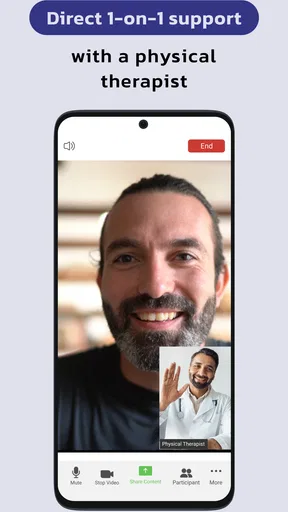
- Offers expert guidance.
Cons
- Limited free content.
- Ads can be intrusive.
- Requires internet connection.
- No offline mode available.
- Occasional app crashes.
FAQs for ACL & Knee Physical Therapy
What features does the ACL & Knee Physical Therapy app offer?
The ACL & Knee Physical Therapy app provides a variety of features including guided video exercises, progress tracking, personalized workout plans, and educational content about knee health. It aims to assist users in their rehabilitation process by offering structured routines developed by physical therapy experts.
Is the ACL & Knee Physical Therapy app suitable for all injury stages?
Yes, the app is designed to cater to different stages of recovery from an ACL or knee injury. It provides tailored exercises that can be adjusted based on your stage of healing, making it suitable for early recovery as well as advanced rehabilitation phases.
Can I use the app without professional supervision?
While the app provides expert-designed workouts and tutorials, it is recommended to consult with a healthcare professional before starting any rehabilitation program. This ensures that the exercises align with your specific medical needs and won't cause further injury.
Does the app require any special equipment?
The ACL & Knee Physical Therapy app primarily uses bodyweight exercises, but some routines might suggest the use of basic equipment like resistance bands or a stability ball. The app provides alternatives if you don’t have access to these tools, ensuring flexibility in your workout routine.
How does the app track my rehabilitation progress?
The app includes a tracking feature that logs your completed exercises and progress over time. It allows you to set goals and monitor improvements in strength and mobility, providing visual feedback through charts and milestones to keep you motivated throughout your recovery journey.


